• ลงทะเบียน หรือ เข้าสู่ระบบ
  • แอปพลิเคชันอื่น ๆ
    • Firefox
    • Firefox สำหรับ Android
    • SeaMonkey

Thunderbird ส่วนเสริม

  • ส่วนขยาย
    • แนะนำ
    • ได้รับความนิยมสูงสุด
    • ถูกจัดอันดับสูงสุด
    • การรองรับภาษา
    • การเขียนข้อความ
    • ข้อความและการอ่านข่าว
    • ความเป็นส่วนตัวและความปลอดภัย
    • นำเข้า/ส่งออก
    • ปฏิทินและวันที่/เวลา
    • ป้ายกำกับ
    • รายชื่อ
    • ลักษณะที่ปรากฏและการปรับแต่ง
    • เบ็ดเตล็ด
    • แชทและ IM
    • โฟลเดอร์และตัวกรอง
  • ชุดตกแต่ง
    • ได้รับความนิยมสูงสุด
    • ถูกจัดอันดับสูงสุด
    • ใหม่สุด
    • กีฬา
    • ทิวทัศน์
    • ธรรมชาติ
    • นามธรรม
    • ภาพยนตร์และโทรทัศน์
    • ฤดูกาล
    • วันหยุด
    • สีทึบ
    • อื่น ๆ
    • เจตจำนง
    • เพลง
    • เว็บไซต์
    • แฟชั่น
    Want more customization? Try Complete Themes
  • ชุดสะสม
    • แนะนำ

    • ชุดสะสมที่ฉันสร้าง
    • ส่วนเสริมโปรดของฉัน
  • เพิ่มเติม…
    • พจนานุกรมและชุดภาษา
    • เครื่องมือค้นหา
    • ศูนย์กลางนักพัฒนา

ยินดีต้อนรับสู่ส่วนเสริม Thunderbird

Add extra features and styles to make Thunderbird your own.

ปิด
On the go?

Check out our Mobile Add-ons site.

ปิด
Rated 4 out of 5 stars
8 การวิจารณ์ของผู้ใช้
924 ผู้ใช้
เพิ่มไปยังชุดสะสม
ไอคอนของ Rspamd-spamness

Rspamd-spamness 2.6.2

โดย Alexander Moisseev

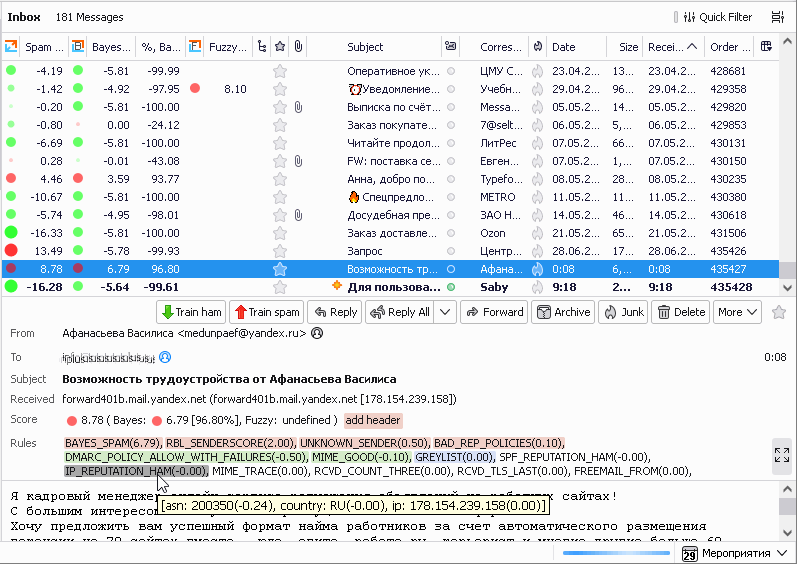
Rspamd spam filtering system score visualization.

ดาวน์โหลดตอนนี้ ดาวน์โหลดต่อไป

สิทธิ์
« »
  • ภาพหน้าจอส่วนเสริม #1
  • ภาพหน้าจอส่วนเสริม #2
  • ภาพหน้าจอส่วนเสริม #3
  • ภาพหน้าจอส่วนเสริม #4
Close
» «
  • หน้าแรกของส่วนเสริม
  • ไซต์สนับสนุน
  • รุ่น 2.6.2 ข้อมูล
  • อัปเดตล่าสุด: ธ.ค. 4, 2025
  • ออกภายใต้ BSD License

เกี่ยวกับส่วนเสริมนี้

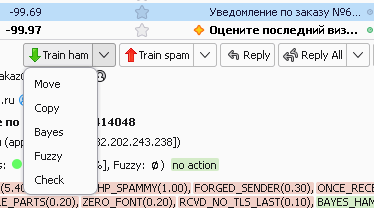
Rspamd-spamness is an add-on for visualizing Rspamd spam scores generated on the server-side and embedded in message headers.

Supported mail headers

The add-on uses extended Rspamd headers added by Rspamd proxy worker (`X-Spamd-Result`) and (from version 0.8.0) headers added by Exim (`X-Spam-Score` and `X-Spam-Report`).

To enable extended spam headers in Milter headers module add the following line to local.d/milter_headers.conf:

extended_spam_headers = true;


To enable headers in Exim refer to the "Integration with Exim MTA" section of MTA integration document.

To enable extended spam headers in Rmilter (deprecated) add the following line to rmilter.conf:

spamd {
...
   &nbsp    extended_spam_headers = yes;
};


Third-party spam filters

The add-on (from version 0.9.0) also supports SpamAssassin-based spam filters (e.g. `SpamAssassin`, `MailScanner`). The support is limited to displaying the total message score in the column.

===========================================================
  Learn more at https://github.com/moisseev/rspamd-spamness .
===========================================================

ความคิดเห็นของนักพัฒนา

=====================================================
Please visit issues page before posting any support-related issues here!
https://github.com/moisseev/rspamd-spamness/issues
=====================================================

ข้อมูลของรุ่น

รุ่น 2.6.2 Released ธ.ค. 4, 2025 72.7 KiB ทำงานกับ Thunderbird 78.0 - 147.*

### Description

This release brings important improvements to validation, error handling, performance, and security.

### New features

- **Add comprehensive input validation to options page**:
Real-time and initial page load numeric field and URL validation with inline error messages

### Improvements

- **Error handling**:
- Add error notifications for all move/copy failures during training operations
- Add error handling to prevent silent failures
- Guard against malformed JSON in LDA mode header

- **Performance**:
- Parallelize tab processing for faster initialization and header updates
- Better error reporting with failure summaries

### Security

- **Prevent potential XSS**: Replace `innerHTML` with `textContent` for symbols to prevent XSS from untrusted header content
  • Source code released under BSD License

ดาวน์โหลดตอนนี้ ดาวน์โหลดต่อไป

ดูประวัติของรุ่นแบบเต็ม

To create your own collections, you must have a Mozilla Add-ons account.

สร้างบัญชีส่วนเสริม

หรือ เข้าสู่ระบบด้วยบัญชีปัจจุบันของคุณ

ปิด

สิทธิ์

Some add-ons ask for permission to perform certain functions (example: a tab management add-on will ask permission to access your browser’s tab system).

Since you’re in control of your Thunderbird, the choice to grant or deny these requests is yours. Accepting permissions does not inherently compromise your browser’s performance or security, but in some rare cases risk may be involved.

ส่วนเสริมนี้สามารถ:

  • Have full, unrestricted access to Thunderbird, and your computer

ปิด

รายงานการละเมิด

  1. If you suspect this add-on violates our policies or has security or privacy issues, please use the form below to describe your concerns. Please do not use this form for any other reason. The process for reporting copyright or trademark infringement is described at this page.

Footer logo
  • get to know add-ons
  • เกี่ยวกับ
  • บล็อก
  • ศูนย์กลางนักพัฒนา
  • กระดานสนทนา

นโยบายความเป็นส่วนตัว  |  Report Trademark or Copyright Infringement  |  ข้อกฎหมาย  |  Report Misuse of Thunderbird Trademark  | รายงานข้อบกพร่อง

Except where otherwise noted, content on this site is licensed under the
Creative Commons Attribution Share-Alike License v3.0 or any later version.