 ส่วนเสริม

![[คำเตือน]](https://addons.thunderbird.net/static/img/developers/test-warning.png?b=58a99cbb-667a0970) สิทธิ์
สิทธิ์

เกี่ยวกับส่วนเสริมนี้
http://addons.palemoon.org/addon/cutebuttons/
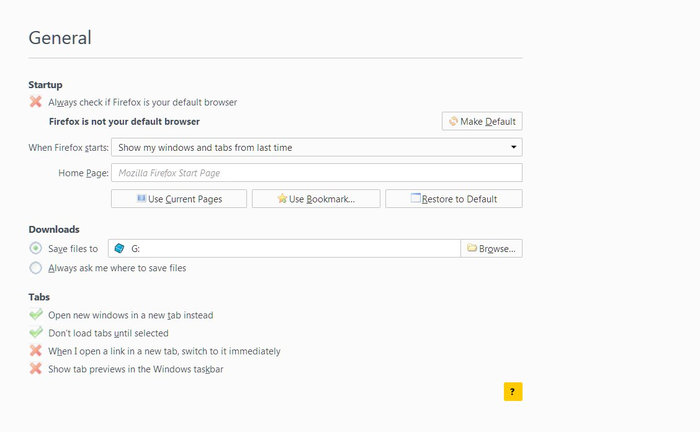
For now you can manually install my CSS files with UserChrome/UserContent (see the github page).
You could also install dev version of Firefox and set extensions.legacy.enabled to true.
Until Mozilla adds an API or other method to globally apply CSS to Firefox, there isn't anything I can do to build a Firefox Quantum version.
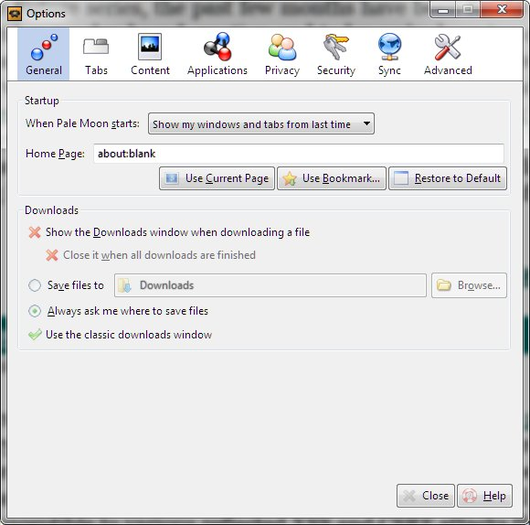
CuteButtons works fine on Pale Moon, and I'll keep it updated on here till Mozilla decides no more XUL add-ons on AMO.
After that keep an eye on the github page or https://addons.palemoon.org/
Please read the Developer Comments before posting a review.
P.S. if you have icons missing/wrong, or you want an extension added then please send me an email.
For some reason this is my only addon that doesn't display the version notes below, so:
https://choggi.org/misc/CuteButtonsCrystalSVG/change.log
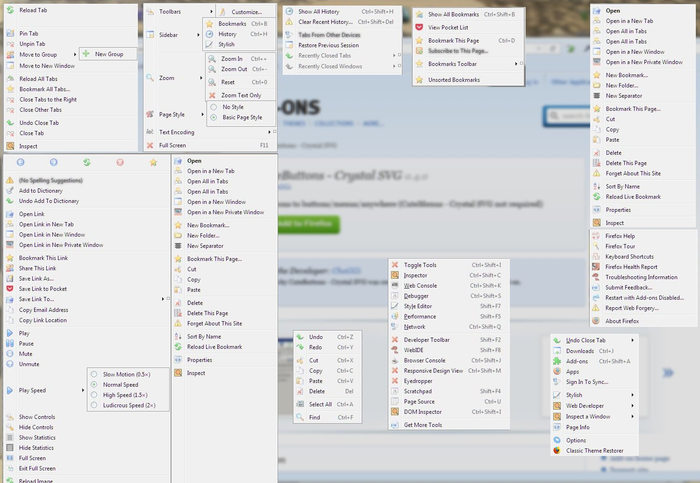
Inspired by/uses code & icon set from CuteMenus - Crystal SVG (you don't need to have CuteMenus installed).
Adds icons to these extensions, and generic icons to others:
(this list hasn't been updated for ages)
Adblock Filterset.G Updater, Adblock Plus, AI Roboform, Autocopy, Autofill Forms
Back to Top, Bookmark DD, British English Dictionary
Calc, Cache Status. Cache View, CacheViewer, Chatzilla, Chrome List, CLE, Clippings, CookieSafe, CustomizeGoogle
Dictionarysearch, Download Statusbar, DownThemAll!
Easy DragToGo, Enigmail, Explore Chrome
FasterFox, Favicon Picker 2, FEBE, Fetch Text URL, Firebug, FireFTP, Fission, FlashGot, Forecastfox, FormFiller, FoxMarks, Foxy Proxy, Foxytunes
Gmail Manager, Gmail Notifier, Googlebar Lite, GreaseMonkey, GSpace
HTML Validator
IE Tab, IEView Lite
JSView
keyconfig
Lightning, LinkVisitor, Live HTTP Headers, LiveClick
Menu Editor, MinimizeToTray, MR Tech Toolkit (Local Install), Multiple Tab Handler
NoScript, NoSquint, Nostalgy
Objection, ObPwd, OmniSidebar, Organize Search Engines, Organize Status Bar
PageShortcuts, Password Hasher, Password Exporter, PasswordMaker, PDF Download, Personal Menu, Perspectives, Public Fox
QuickNote
RDFViewer, Redirect Remover, Remove it Permanently, RSS Ticker
Sage, Save Link in Folder, Secure Login, Session Manager, Smart Link, SmoothWheel, SQLite Manager, Show Picture, Splash!, Split Browser, StumbleUpon, Stylish, Stylish-Custom, StyleSheet Chooser Plus
Tab Mix Plus, TargetKiller, Titlebar Tweaks, Tweak Network
Update Notifier, Update Scanner, Unplug
View Cookies
WeatherBug, Wizz RSS
Xmarks
LouCypher's inspectWindow.uc.js/inspectChrome.uc.js
For now you can manually install my CSS files with UserChrome/UserContent (see the github page).
You could also install dev version of Firefox and set extensions.legacy.enabled to true.
Until Mozilla adds an API or other method to globally apply CSS to Firefox, there isn't anything I can do to build a Firefox Quantum version.
CuteButtons works fine on Pale Moon, and I'll keep it updated on here till Mozilla decides no more XUL add-ons on AMO.
After that keep an eye on the github page or https://addons.palemoon.org/
Please read the Developer Comments before posting a review.
P.S. if you have icons missing/wrong, or you want an extension added then please send me an email.
For some reason this is my only addon that doesn't display the version notes below, so:
https://choggi.org/misc/CuteButtonsCrystalSVG/change.log
Inspired by/uses code & icon set from CuteMenus - Crystal SVG (you don't need to have CuteMenus installed).
Adds icons to these extensions, and generic icons to others:
(this list hasn't been updated for ages)
Adblock Filterset.G Updater, Adblock Plus, AI Roboform, Autocopy, Autofill Forms
Back to Top, Bookmark DD, British English Dictionary
Calc, Cache Status. Cache View, CacheViewer, Chatzilla, Chrome List, CLE, Clippings, CookieSafe, CustomizeGoogle
Dictionarysearch, Download Statusbar, DownThemAll!
Easy DragToGo, Enigmail, Explore Chrome
FasterFox, Favicon Picker 2, FEBE, Fetch Text URL, Firebug, FireFTP, Fission, FlashGot, Forecastfox, FormFiller, FoxMarks, Foxy Proxy, Foxytunes
Gmail Manager, Gmail Notifier, Googlebar Lite, GreaseMonkey, GSpace
HTML Validator
IE Tab, IEView Lite
JSView
keyconfig
Lightning, LinkVisitor, Live HTTP Headers, LiveClick
Menu Editor, MinimizeToTray, MR Tech Toolkit (Local Install), Multiple Tab Handler
NoScript, NoSquint, Nostalgy
Objection, ObPwd, OmniSidebar, Organize Search Engines, Organize Status Bar
PageShortcuts, Password Hasher, Password Exporter, PasswordMaker, PDF Download, Personal Menu, Perspectives, Public Fox
QuickNote
RDFViewer, Redirect Remover, Remove it Permanently, RSS Ticker
Sage, Save Link in Folder, Secure Login, Session Manager, Smart Link, SmoothWheel, SQLite Manager, Show Picture, Splash!, Split Browser, StumbleUpon, Stylish, Stylish-Custom, StyleSheet Chooser Plus
Tab Mix Plus, TargetKiller, Titlebar Tweaks, Tweak Network
Update Notifier, Update Scanner, Unplug
View Cookies
WeatherBug, Wizz RSS
Xmarks
LouCypher's inspectWindow.uc.js/inspectChrome.uc.js
