 ส่วนเสริม

Youtube MP3 Podcaster 3.9.0 Requires Restart
โดย Jeremy Gregorio
Self contained add-on for downloading youtube videos to mp3 for easy listening on podcasting gadgets like a Zune or iPod
![[คำเตือน]](https://addons.thunderbird.net/static/img/developers/test-warning.png?b=58a99cbb-667a0970) สิทธิ์
สิทธิ์
เกี่ยวกับส่วนเสริมนี้
The fastest way to download youtube mp3s. You can download video too. All my favorite podcasts turned into 'tubecasts', which made play back on car stereos impossible.
Youtube MP3 Podcaster is the easy solution. mp3s download directly instead of through a website. That makes it faster and more convenient.
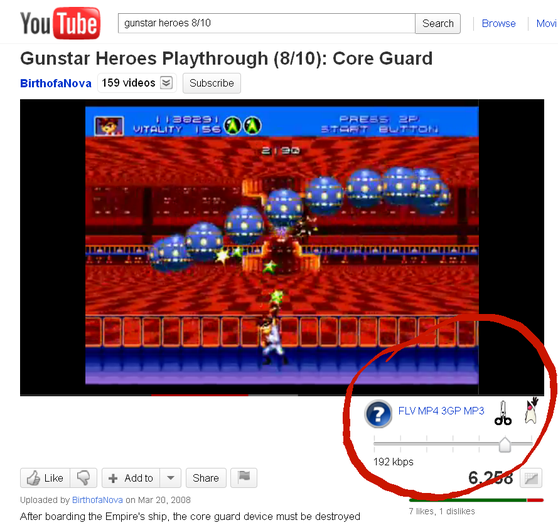
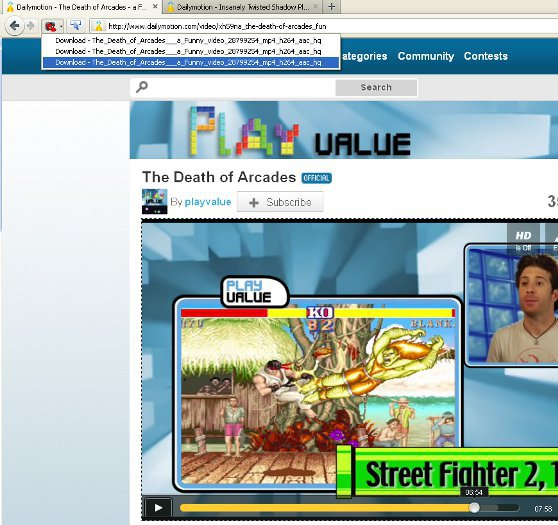
Now you can download videos and MP3s from more sites! Click the toolbar button to see a list of downloads. Videos become available in the toolbar as they start to play.
YoutubeMP3Podcaster gives you the best quality MP3s!
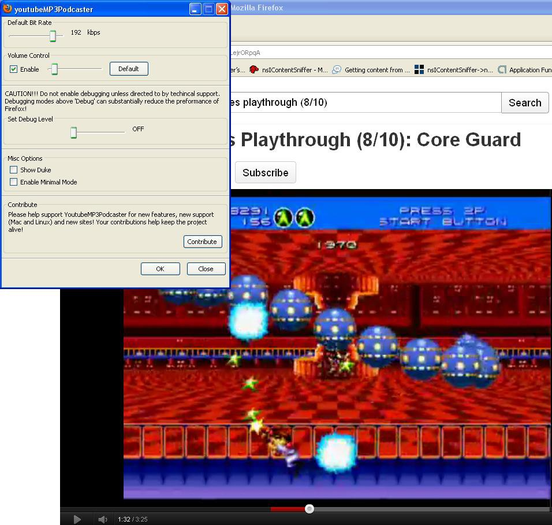
Support for Bit-Rates up to 224 kbps!
Volume Control! MP3s automatically adjust to the correct volume, so your playlist maintain consistent sound quality!
Clippers let you trim off dead air & unwanted introductions on Youtube. Click the scissors and they'll start moving. Pause the video on youtube and start your download. You download will begin from where you paused!
v2.4.3 has fixes for the lastest youtube pages, for dailymotion and blip.tv, variable bit-rate support, volume control, a new Minimal mode that hides controls you're not using, and a new toolbar icon.
Send any support requests to Jeremy.Firefox.Addon@gmail.com. Please check my facebook page first :) and consider posting a 'Like' for this page!
Please post reviews with any features/enhancements you would like!
Youtube MP3 Podcaster is the easy solution. mp3s download directly instead of through a website. That makes it faster and more convenient.
Now you can download videos and MP3s from more sites! Click the toolbar button to see a list of downloads. Videos become available in the toolbar as they start to play.
YoutubeMP3Podcaster gives you the best quality MP3s!
Support for Bit-Rates up to 224 kbps!
Volume Control! MP3s automatically adjust to the correct volume, so your playlist maintain consistent sound quality!
Clippers let you trim off dead air & unwanted introductions on Youtube. Click the scissors and they'll start moving. Pause the video on youtube and start your download. You download will begin from where you paused!
v2.4.3 has fixes for the lastest youtube pages, for dailymotion and blip.tv, variable bit-rate support, volume control, a new Minimal mode that hides controls you're not using, and a new toolbar icon.
Send any support requests to Jeremy.Firefox.Addon@gmail.com. Please check my facebook page first :) and consider posting a 'Like' for this page!
Please post reviews with any features/enhancements you would like!
