 ส่วนเสริม

![[คำเตือน]](https://addons.thunderbird.net/static/img/developers/test-warning.png?b=58a99cbb-667a0970) สิทธิ์
สิทธิ์

เกี่ยวกับส่วนเสริมนี้
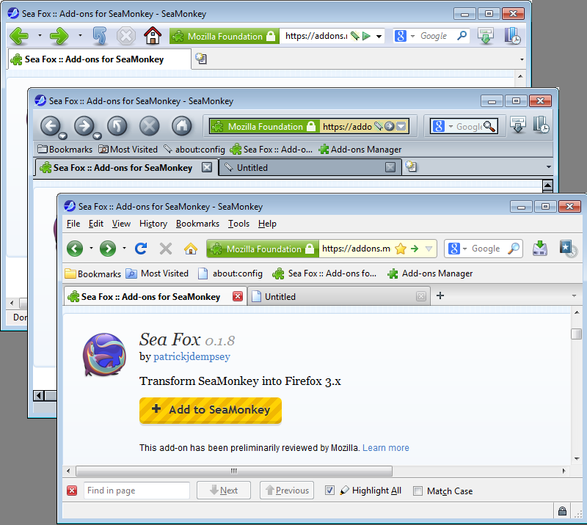
This extension will convert the Seamonkey browser to be similar to Firefox 3.x. It is not meant to be an exact duplicate of any specific version of Firefox, as I don't think any version was ever "perfect" to be worth exactly duplicating. In fact, there are several features that I've tried to "improve" over the Firefox implementation.
This is for fans of Firefox who are dismayed with current Firefox UI direction. Because it disables and changes some features, people accustomed to SeaMonkey may not enjoy it. If you only want tab closers, please use SeaTab-X-2: https://addons.mozilla.org/en-US/seamonkey/addon/seatab-x-2/
When you first install Sea Fox, there will be a First Run panel listing Opt Ins and Opt Outs for preference changes. This is not a live "Options" panel, but the settings can be changed at any time using the following listings in about:config:
First-run preference changes:
- Show close buttons on all tabs: browser.tabs.closeButtons
- Open new tabs at the end of the tab bar: browser.tabs.insertRelatedAfterCurrent
- Always show the tab bar: browser.tabs.autoHide
- Disable SeaMonkey tab previews: browser.tabs.tooltippreview.enable
- Disable urlbar domain highlighting: browser.urlbar.formatting.enabled
- Disable type-ahead find: accessibility.typeaheadfind and accessibility.typeaheadfind.autostart
- Aggressive favicon lookup: browser.chrome.favicons and browser.chrome.site_icons
- Disable fast mousewheel scrolling:
mousewheel.system_scroll_override_on_root_content.enabled
- Disable yellow secure background on urlbar: browser.urlbar.highlight.secure
- Hide SeaMonkey features: Mail, Editor, Addressbook, Web Navigation bar:
extensions.seafox.components.disable
- Rearrange main menus: extensions.seafox.menus.rearrange
Keyboard Shortcuts:
- New Private Window: Ctrl+Shift+P
- Search The Web: Ctrl+K
- Toggle History Sidebar: Ctrl+H (disabled on OSX)
- Show History Manager: Ctrl+Shift+H
- Toggle Bookmarks Sidebar: Ctrl+B
- Show Bookmarks Manager: Ctrl+Shift+B
- Bookmark This Page: Ctrl+D
- Bookmark This Group of Tabs: Ctrl+Shift+D
Features:
- Firefox 3.x-style urlbar Identity box with color notifications and Go button
- hide the menubar with toolbar context menu, press Alt to show
- tab closers, and Firefox-style tabstrip new tab buttons
- support for browser.newtab.url
- classic Findbar with Next and Previous labels and accesskeys
- classic View Image look
- Firefox toolbar button arrangements on first-run
- Downloads, Sidebar, Cut, Copy, Paste, New Tab, New Window toolbar buttons
- hidden toolbar grippies, SM Components, and cleaned-up menus
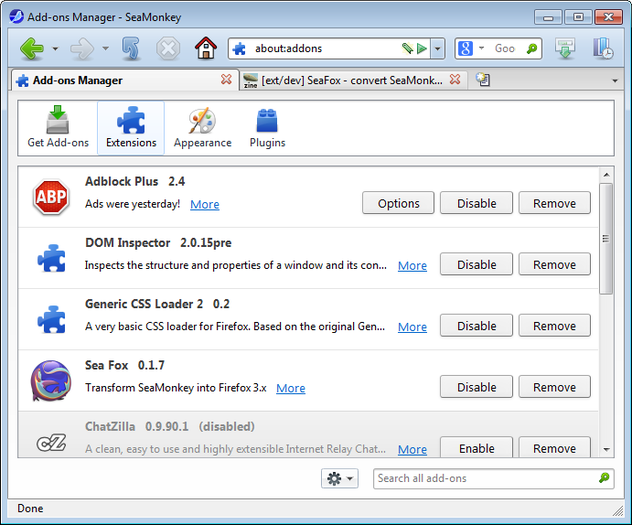
- Downloads Manager and Addons Manager more like Firefox 3.x
- customizable section to right side of Statusbar
- support for Default, Modern, and Firefox 3 Theme for SeaMonkey
- switch several SeaMonkey preferences to Firefox 3.x defaults on first-run
Firefox Themes:
In addition to the SeaMonkey Default and Modern themes, SeaFox is compatible with all SeaMonkey themes I have tested against. To complete the Firefox look, try one of these:
Firefox 3 Theme for SeaMonkey:
https://addons.mozilla.org/en-US/seamonkey/addon/firefox-3-theme-for-seamonk/
Classic Firefox Theme for SeaMonkey:
https://addons.mozilla.org/en-US/seamonkey/addon/classic-firefox-theme-for-seam/
Classic Toolbar Buttons:
https://addons.mozilla.org/en-US/seamonkey/addon/cstbb/
Addons Sea Fox replaces:
- Sea Tab X: code borrowed with the Sea Tab X developer's permission and blessing.
- Old Default Image Style: Sea Fox uses a different method to restore the old top level images look.
- Combined Stop/Reload CSS hacks or extensions. This is built-in as of version 0.2.2.
Support:
Questions, bug reports and support here:
http://forums.mozillazine.org/viewtopic.php?f=48&t=2836799
This is for fans of Firefox who are dismayed with current Firefox UI direction. Because it disables and changes some features, people accustomed to SeaMonkey may not enjoy it. If you only want tab closers, please use SeaTab-X-2: https://addons.mozilla.org/en-US/seamonkey/addon/seatab-x-2/
When you first install Sea Fox, there will be a First Run panel listing Opt Ins and Opt Outs for preference changes. This is not a live "Options" panel, but the settings can be changed at any time using the following listings in about:config:
First-run preference changes:
- Show close buttons on all tabs: browser.tabs.closeButtons
- Open new tabs at the end of the tab bar: browser.tabs.insertRelatedAfterCurrent
- Always show the tab bar: browser.tabs.autoHide
- Disable SeaMonkey tab previews: browser.tabs.tooltippreview.enable
- Disable urlbar domain highlighting: browser.urlbar.formatting.enabled
- Disable type-ahead find: accessibility.typeaheadfind and accessibility.typeaheadfind.autostart
- Aggressive favicon lookup: browser.chrome.favicons and browser.chrome.site_icons
- Disable fast mousewheel scrolling:
mousewheel.system_scroll_override_on_root_content.enabled
- Disable yellow secure background on urlbar: browser.urlbar.highlight.secure
- Hide SeaMonkey features: Mail, Editor, Addressbook, Web Navigation bar:
extensions.seafox.components.disable
- Rearrange main menus: extensions.seafox.menus.rearrange
Keyboard Shortcuts:
- New Private Window: Ctrl+Shift+P
- Search The Web: Ctrl+K
- Toggle History Sidebar: Ctrl+H (disabled on OSX)
- Show History Manager: Ctrl+Shift+H
- Toggle Bookmarks Sidebar: Ctrl+B
- Show Bookmarks Manager: Ctrl+Shift+B
- Bookmark This Page: Ctrl+D
- Bookmark This Group of Tabs: Ctrl+Shift+D
Features:
- Firefox 3.x-style urlbar Identity box with color notifications and Go button
- hide the menubar with toolbar context menu, press Alt to show
- tab closers, and Firefox-style tabstrip new tab buttons
- support for browser.newtab.url
- classic Findbar with Next and Previous labels and accesskeys
- classic View Image look
- Firefox toolbar button arrangements on first-run
- Downloads, Sidebar, Cut, Copy, Paste, New Tab, New Window toolbar buttons
- hidden toolbar grippies, SM Components, and cleaned-up menus
- Downloads Manager and Addons Manager more like Firefox 3.x
- customizable section to right side of Statusbar
- support for Default, Modern, and Firefox 3 Theme for SeaMonkey
- switch several SeaMonkey preferences to Firefox 3.x defaults on first-run
Firefox Themes:
In addition to the SeaMonkey Default and Modern themes, SeaFox is compatible with all SeaMonkey themes I have tested against. To complete the Firefox look, try one of these:
Firefox 3 Theme for SeaMonkey:
https://addons.mozilla.org/en-US/seamonkey/addon/firefox-3-theme-for-seamonk/
Classic Firefox Theme for SeaMonkey:
https://addons.mozilla.org/en-US/seamonkey/addon/classic-firefox-theme-for-seam/
Classic Toolbar Buttons:
https://addons.mozilla.org/en-US/seamonkey/addon/cstbb/
Addons Sea Fox replaces:
- Sea Tab X: code borrowed with the Sea Tab X developer's permission and blessing.
- Old Default Image Style: Sea Fox uses a different method to restore the old top level images look.
- Combined Stop/Reload CSS hacks or extensions. This is built-in as of version 0.2.2.
Support:
Questions, bug reports and support here:
http://forums.mozillazine.org/viewtopic.php?f=48&t=2836799
