• ลงทะเบียน หรือ เข้าสู่ระบบ
  • แอปพลิเคชันอื่น ๆ
    • Firefox
    • Firefox สำหรับ Android
    • SeaMonkey

Thunderbird ส่วนเสริม

  • ส่วนขยาย
    • แนะนำ
    • ได้รับความนิยมสูงสุด
    • ถูกจัดอันดับสูงสุด
    • การรองรับภาษา
    • การเขียนข้อความ
    • ข้อความและการอ่านข่าว
    • ความเป็นส่วนตัวและความปลอดภัย
    • นำเข้า/ส่งออก
    • ปฏิทินและวันที่/เวลา
    • ป้ายกำกับ
    • รายชื่อ
    • ลักษณะที่ปรากฏและการปรับแต่ง
    • เบ็ดเตล็ด
    • แชทและ IM
    • โฟลเดอร์และตัวกรอง
  • ชุดตกแต่ง
    • ได้รับความนิยมสูงสุด
    • ถูกจัดอันดับสูงสุด
    • ใหม่สุด
    • กีฬา
    • ทิวทัศน์
    • ธรรมชาติ
    • นามธรรม
    • ภาพยนตร์และโทรทัศน์
    • ฤดูกาล
    • วันหยุด
    • สีทึบ
    • อื่น ๆ
    • เจตจำนง
    • เพลง
    • เว็บไซต์
    • แฟชั่น
    Want more customization? Try Complete Themes
  • ชุดสะสม
    • แนะนำ

    • ชุดสะสมที่ฉันสร้าง
    • ส่วนเสริมโปรดของฉัน
  • เพิ่มเติม…
    • พจนานุกรมและชุดภาษา
    • เครื่องมือค้นหา
    • ศูนย์กลางนักพัฒนา

ยินดีต้อนรับสู่ส่วนเสริม Thunderbird

Add extra features and styles to make Thunderbird your own.

ปิด

On the go?

Check out our Mobile Add-ons site.

ปิด
Rated 4 out of 5 stars
8 การวิจารณ์ของผู้ใช้
1 ผู้ใช้
เพิ่มไปยังชุดสะสม
ไอคอนของ QuickMenuMC

QuickMenuMC 0.9.2.1 Requires Restart

โดย Krzysztof Janowicz (Jano)

QuickMenu for MoveTo and CopyTo...

ดาวน์โหลดตอนนี้ ดาวน์โหลดต่อไป

[คำเตือน]สิทธิ์
« »
  • ภาพหน้าจอส่วนเสริม #1
Close
» «
  • หน้าแรกของส่วนเสริม
  • รุ่น 0.9.2.1 ข้อมูล
  • อัปเดตล่าสุด: ม.ค. 28, 2006

เกี่ยวกับส่วนเสริมนี้

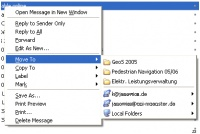
QuickMenu for MoveTo and CopyTo:
The extension memorizes the most often used folders and offers a quick access to copy or move messages to this folders (see preview picture). The default setting is 4, but you can modify the number of folders to be memorized using the config editor (/Tools/Options.../Advanced/General/Config Editor/QuickMenuMC.Slots).

ความคิดเห็นของนักพัฒนา

[needs Thunderbird min. 1.5]

if you have any problems running QMMC (up to now it was tested for win, linux and OS X) or ideas how to improve it, please let me know (e.g. by mail) and i will try to find a solution :-)

#KNOWN ISSUES#

1.MboxImport:
There may be problems with an installed MboxImport extension. in such cases MboxImport has to be deactivated *temporary* during the QMMC installation.

2. Context-Menu in Message Window
The QMMC menu does not appear in the context menu of an open message but only in the mailbox/accoun view. This problem will be fixed in 0.9.2.2

3. Folder Names
There may be problems with some special characters (e.g. chinese). I am working on that problem already.

ข้อมูลของรุ่น

รุ่น 0.9.2.1 Released ม.ค. 28, 2006 4.0 KiB ทำงานกับ Thunderbird 1.5 - 3.1a1pre

*update*
IMO the extension should work with Thunderbird 3, but this needs some testing....

[needs Thunderbird min. 1.5]

if you have any problems running QMMC (up to now it was tested for win, linux and OS X) or ideas how to improve it, please let me know (e.g. by mail) and i will try to find a solution :-)

#KNOWN ISSUES#

1.MboxImport:
There may be problems with an installed MboxImport extension. in such cases MboxImport has to be deactivated *temporary* during the QMMC installation.

2. Context-Menu in Message Window
The QMMC menu does not appear in the context menu of an open message but only in the mailbox/accoun view. This problem will be fixed in 0.9.2.2

3. Folder Names
There may be problems with some special characters (e.g. chinese). I am working on that problem already.

ดาวน์โหลดตอนนี้ ดาวน์โหลดต่อไป

ดูประวัติของรุ่นแบบเต็ม

To create your own collections, you must have a Mozilla Add-ons account.

สร้างบัญชีส่วนเสริม

หรือ เข้าสู่ระบบด้วยบัญชีปัจจุบันของคุณ

ปิด

สิทธิ์

[คำเตือน]

Some add-ons ask for permission to perform certain functions. Since you’re in control of your Thunderbird, the choice to grant or deny these requests is yours.

Please note this add-on uses legacy technology, which gives it access to all browser functions and data without requesting your permission.

ปิด

รายงานการละเมิด

  1. If you suspect this add-on violates our policies or has security or privacy issues, please use the form below to describe your concerns. Please do not use this form for any other reason. The process for reporting copyright or trademark infringement is described at this page.

Footer logo
  • get to know add-ons
  • เกี่ยวกับ
  • บล็อก
  • ศูนย์กลางนักพัฒนา
  • กระดานสนทนา

นโยบายความเป็นส่วนตัว  |  Report Trademark or Copyright Infringement  |  ข้อกฎหมาย  |  Report Misuse of Thunderbird Trademark  | รายงานข้อบกพร่อง

Except where otherwise noted, content on this site is licensed under the
Creative Commons Attribution Share-Alike License v3.0 or any later version.