• ลงทะเบียน หรือ เข้าสู่ระบบ
  • แอปพลิเคชันอื่น ๆ
    • Firefox
    • Thunderbird
    • Firefox สำหรับ Android

SeaMonkey ส่วนเสริม

  • ส่วนขยาย
    • แนะนำ
    • ได้รับความนิยมสูงสุด
    • ถูกจัดอันดับสูงสุด
    • RSS, ข่าว และบล็อก
    • Site-specific
    • การดาวน์โหลดและการจัดการไฟล์
    • การปรับแต่งส่วนติดต่อ
    • การรองรับและการแปลภาษา
    • ความเป็นส่วนตัวและความปลอดภัย
    • ที่คั่นหน้า
    • รูปภาพและสื่อ
    • เครื่องมือค้นหา
    • เบ็ดเตล็ด
    • เว็บและเครื่องมือนักพัฒนา
  • ชุดตกแต่ง
    • ได้รับความนิยมสูงสุด
    • ถูกจัดอันดับสูงสุด
    • ใหม่สุด
    • กีฬา
    • ทิวทัศน์
    • ธรรมชาติ
    • นามธรรม
    • ภาพยนตร์และโทรทัศน์
    • ฤดูกาล
    • วันหยุด
    • สีทึบ
    • อื่น ๆ
    • เจตจำนง
    • เพลง
    • เว็บไซต์
    • แฟชั่น
    Want more customization? Try Complete Themes
  • ชุดสะสม
    • แนะนำ

    • ชุดสะสมที่ฉันสร้าง
    • ส่วนเสริมโปรดของฉัน
  • เพิ่มเติม…
    • พจนานุกรมและชุดภาษา
    • เครื่องมือค้นหา
    • ศูนย์กลางนักพัฒนา

ยินดีต้อนรับสู่ส่วนเสริม SeaMonkey

Add extra features and styles to make SeaMonkey your own.

ปิด

On the go?

Check out our Mobile Add-ons site.

ปิด
Rated 4 out of 5 stars
80 การวิจารณ์ของผู้ใช้
17 ผู้ใช้
เพิ่มไปยังชุดสะสม
ไอคอนของ CookieKeeper

CookieKeeper 1.9.3.1

โดย Yvon Tanguy

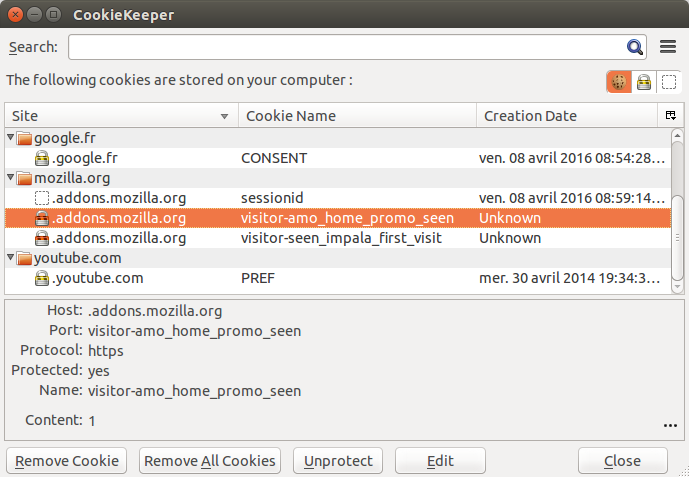
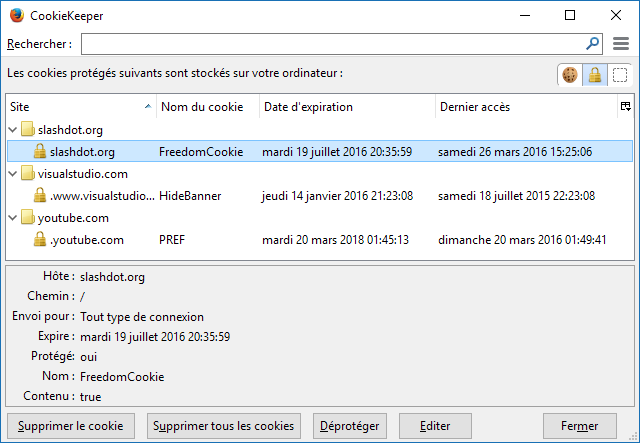
Extended Cookie Manager - Keep only wanted cookies.

ดาวน์โหลด สำหรับ Linux ดาวน์โหลดต่อไป ดาวน์โหลด สำหรับ Mac OS X ดาวน์โหลดต่อไป ดาวน์โหลด สำหรับ Windows ดาวน์โหลดต่อไป

[คำเตือน]สิทธิ์
« »
  • ภาพหน้าจอส่วนเสริม #1
  • ภาพหน้าจอส่วนเสริม #2
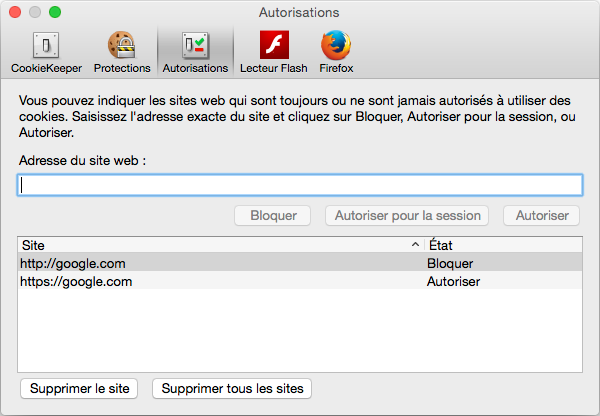
  • ภาพหน้าจอส่วนเสริม #3
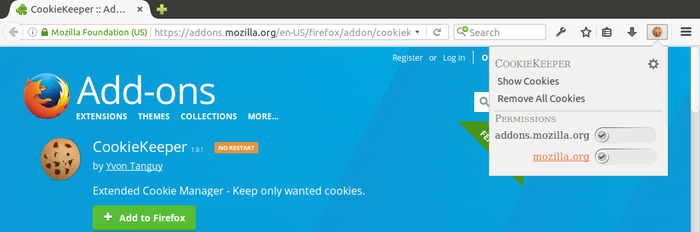
  • ภาพหน้าจอส่วนเสริม #4
  • ภาพหน้าจอส่วนเสริม #5
  • ภาพหน้าจอส่วนเสริม #6
  • ภาพหน้าจอส่วนเสริม #7
  • ภาพหน้าจอส่วนเสริม #8
Close
» «
  • ไซต์สนับสนุน
  • อีเมลสนับสนุนmoc.liamg@nodda.repeekeikonulloc
  • รุ่น 1.9.3.1 ข้อมูล
  • อัปเดตล่าสุด: เม.ย. 30, 2016
  • ออกภายใต้ Mozilla Public License, version 2.0

เกี่ยวกับส่วนเสริมนี้

Keep the cookies you want, delete the rest.

This add-on has started as an update of CookieCuller for newer Firefox version. I have finally rewrote the whole code, based on the Mozilla cookie window.

For version 1.9.0
See the changelog here: https://addons.mozilla.org/en-US/firefox/addon/cookiekeeper/versions/1.9.0
Supported Mozilla based applications:
  • Firefox 38.0 to 49.0
  • Thunderbird 38.0 to 49.0
  • SeaMonkey 2.40 to 2.46
  • Palemoon 25.0 to 26.0
  • K-Meleon 75.0

Note for Palemoon users:
By default on Palemoon 26.1 you may see that CookieKeeper 1.9 is not compatible with Firefox 24.9. To be able to install CookieKeeper you must update in the "about:config" the option:
general.useragent.override.addons.mozilla.org
with a compatible Firefox version. For example, this value work:
Mozilla/5.0 (Linux; X11; rv:24.9) Gecko/20100101 Firefox/45.0 (Pale Moon)

Note for K-Meleon users:
This is the first release of CookieKeeper with a K-Meleon support. This support is minimal, for example, the dynamic menu is not implemented.
To install CK on K-Meleon:
  • Force the module installation by clicking on the grey button "Add to Firefox", then "Install Anyway"
  • Quit K-Meleon
  • Go to your K-Meleon profil directory C:\Users\<username>\AppData\Roaming\K-Meleon\<profile_id>.
  • Create a new folder named macros if it do not already exists.
  • Then open the folder extensions and with your favorite ZIP file manager, open the file cookiekeeper@cookiekeeper.mozdev.org.xpi. Extract the file cookiekeeper.kmm located in the kmeleon sub-folder, to the previously created macros directory
  • Restart K-Meleon. Use the Tools menu to access to the CookieKeeper interface.


If you whish to have CookieKeeper in your language, you can help here: http://www.babelzilla.org/index.php

ความคิดเห็นของนักพัฒนา

For the bank plugin user of http://chipkarte.santanderbank.de/ : If you have trouble to run the plugin, when CookieKeeper is installed, you can add a delay to the CookieKeeper init.

in the address bar type "about:config" (without the quotes, see mozillazine.org for more explanations), then press enter. Search for the preference "extensions.cookiekeeper.startup_delay" (without the quotes), then modify the value to one it fits you.
The value is in millisecond, so enter 1000 for 1s, 2000 for 2s etc.

ข้อมูลของรุ่น

รุ่น 1.9.3.1 Released เม.ย. 30, 2016 350.3 KiB ทำงานกับ Firefox 38.0 - 56.*, SeaMonkey 2.40 - 2.46, Thunderbird 38.0 - 49.0

→ Fixed:
  • #1569423: Mozilla function nsICookie.remove() changed again (Fix in the cookie editor).
  • #1571805: Fix import cookies from json. An error was displayed for protected cookies.
  • #1573145: Don't display / remove storage of WebExtensions.
  • #1573744: Dom storage editor: changes are not saved anymore.
  • #1575664: CK1.9.0: German translation update.
  • Source code released under Mozilla Public License, version 2.0

ดาวน์โหลด สำหรับ Linux ดาวน์โหลดต่อไป ดาวน์โหลด สำหรับ Mac OS X ดาวน์โหลดต่อไป ดาวน์โหลด สำหรับ Windows ดาวน์โหลดต่อไป

ดูประวัติของรุ่นแบบเต็ม

To create your own collections, you must have a Mozilla Add-ons account.

สร้างบัญชีส่วนเสริม

หรือ เข้าสู่ระบบด้วยบัญชีปัจจุบันของคุณ

ปิด

สิทธิ์

[คำเตือน]

Some add-ons ask for permission to perform certain functions. Since you’re in control of your Thunderbird, the choice to grant or deny these requests is yours.

Please note this add-on uses legacy technology, which gives it access to all browser functions and data without requesting your permission.

ปิด

รายงานการละเมิด

  1. If you suspect this add-on violates our policies or has security or privacy issues, please use the form below to describe your concerns. Please do not use this form for any other reason. The process for reporting copyright or trademark infringement is described at this page.

Footer logo
  • get to know add-ons
  • เกี่ยวกับ
  • บล็อก
  • ศูนย์กลางนักพัฒนา
  • กระดานสนทนา

นโยบายความเป็นส่วนตัว  |  Report Trademark or Copyright Infringement  |  ข้อกฎหมาย  |  Report Misuse of Thunderbird Trademark  | รายงานข้อบกพร่อง

Except where otherwise noted, content on this site is licensed under the
Creative Commons Attribution Share-Alike License v3.0 or any later version.