 Tillägg
Välkommen till Thunderbird tillägg.
Lägg till extra funktioner och stilar för att göra Thunderbird till ditt.
StängSkriva meddelanden
-
SmartTemplate4
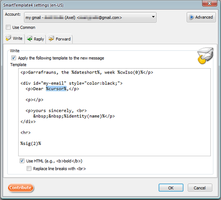
SmartTemplate4 offers an easy way to customize Thunderbirds default quote header by using templates. Templates can be created for every account as well as for global settings (for all email accounts).
4 125 användare -
*cloud - FileLink for Nextcloud and ownCloud
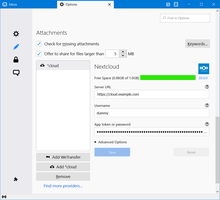
Upload large attachments to your Cloud and send the link by email
41 910 användare
Mest populära Visa alla »
-
 “Skicka senare”-funktion som låter användaren schemalägga tidpunkten för sändning av ett e-brev.129 386 användare
 -
 Create and Save or Send Multiple Individual and Personalized Messages from a Draft83 138 användare
 -
 Check your emails for spelling and grammar issues80 764 användare
 -
 Switch the signature on/off or choose a new one from your predefined set.60 237 användare
 -
 Securely encrypt and upload large attachments to any Send service instance (formerly Firefox Send).56 224 användare
 -
 Highlights selected text when composing emails. Default colour is yellow - other colours are available via Options.
(Works only during writing an e-mail, i.e. only in the compose window.)55 768 användare
Högst rankade Visa alla »
-
 Quickly choose one of the previously selected colors for a message text2 091 användare
 -
 Thunderbird は Outlook のようにアドレス全選択からの「一括コピー」ができません。
それを実現するためのアドオンです。492 användare -
Macro Template is to replace mail templates with macros for date formatting.617 användare
-
Default "Reply" functionality pays attention to "Reply-To" in original email61 användare
-
 Allows you to use your Exchange and Office365 email account with Thunderbird using Outlook Web Access (OWA).47 527 användare
 -
Create and Save or Send Multiple Individual and Personalized Messages from a Draft83 138 användare
Nyligen tillagd Visa alla »
-
A lightweight Thunderbird add-on that allows you to add private comments to emails. These comments are stored as "Unsent Replies" directly within the same folder as the original message, ensuring your notes sync across all your devices.2 användare
-
 MailCheck helps prevent accidental email leaks by checking recipient domains before sending. Can be configured to warn & allow users to deny when email messages include non-allowed domains or prohibited domains.3 användare
 -
 ToneCraft is a Thunderbird extension that detects (and blocks) unprofessional language in outgoing emails and suggests polite alternatives with AI.
It helps you maintain a courteous tone and avoid accidental rudeness.1 användare -
 Inline grammar suggestions while composing email. You bring your own LLM via an Open AI-compatible provider, including local LLM; tested with LM Studio on Ubuntu and together.ai Defaults to google/gemma-3n-E4B-it1 användare
 -
 Paste clipboard images inline in Thunderbird with PNG, JPG, or automatic format selection.11 användare
 -
 Sets a default font of your choice for every new composed e-mail.26 användare
Visa alla 292 utökningar i Skriva meddelanden »
För att skapa egna samlingar, måste du ha ett konto för Mozilla tillägg.
