 Tiện ích
To try the thousands of add-ons available here, download Mozilla Firefox, a fast, free way to surf the Web!
ĐóngChào mừng đến với tiện ích Firefox.
Choose from thousands of extra features and styles to make Firefox your own.
Đóng
Channel Guard 0.1.6.1a.1-signed.1-signed Bắt buộc khởi động lại
bởi Garisson Kingstorm
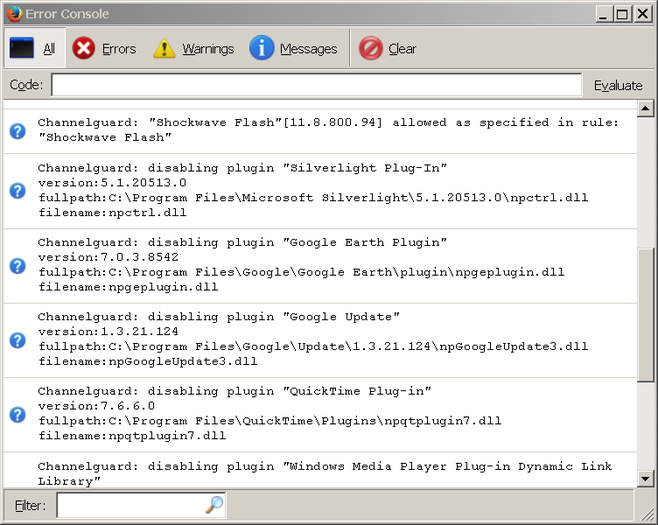
Channelguard disables plugins and protocol handlers to ensure maximum security against side-channel attack.
![[Cảnh báo]](https://addons.thunderbird.net/static/img/developers/test-warning.png?b=58a99cbb-667a0970) Sự cho phép
Sự cho phép
Giới thiệu về Tiện ích này
Usually your browser stays safe. But evil sites could breach your security and anonymity, by invoking third party plugins (e.g. Java, Silverlight) and external protocol handling applications (e.g. VLC, PDF Readers) with exploitable or identifiable unique links. They could exploit bugs in plugins or applications, reveal your identity if they don't regard your proxy settings.
These are "side-channels" to bypass your rock solid browser. To minimize the attack surface, ChannelGuard disable all enabled plugins(if any), external protocol handlers on every browser start-up, except user specified ones. Every time a new plugin is installed with new programs like .Net or Java updates, it stays disabled until you whitelist them in ChannelGuard and enable them manually.
To add a whitelist item, do the following:
- Figure out the unversioned name of your plugin, for example "Java(TM) Platform SE U31 6.3xxx " should be "Java(TM) Platform SE"
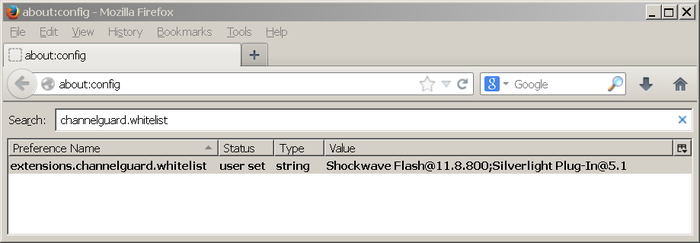
- open "about:config" in new tab, search for "extensions.channelguard.whitelist" enter as many as plugin names you need, seperate them with ";".
- enable these plugins in addon manager, ChannelGuard will not disable them on further restarts.
Why manual disabling is not enough ?
- Because new plugins and protocols could come anytime during new applications installation/update. Applications like Java install a new plugins for every major update. Portable Firefox on every system sees different plugins enabled. No one could be bothered to check and manage new plugins every time in these situations.
With a white-list mechanism like ChannelGuard, only the specified known plugins are enabled, new plugins are screened automatically.
These are "side-channels" to bypass your rock solid browser. To minimize the attack surface, ChannelGuard disable all enabled plugins(if any), external protocol handlers on every browser start-up, except user specified ones. Every time a new plugin is installed with new programs like .Net or Java updates, it stays disabled until you whitelist them in ChannelGuard and enable them manually.
To add a whitelist item, do the following:
- Figure out the unversioned name of your plugin, for example "Java(TM) Platform SE U31 6.3xxx " should be "Java(TM) Platform SE"
- open "about:config" in new tab, search for "extensions.channelguard.whitelist" enter as many as plugin names you need, seperate them with ";".
- enable these plugins in addon manager, ChannelGuard will not disable them on further restarts.
Why manual disabling is not enough ?
- Because new plugins and protocols could come anytime during new applications installation/update. Applications like Java install a new plugins for every major update. Portable Firefox on every system sees different plugins enabled. No one could be bothered to check and manage new plugins every time in these situations.
With a white-list mechanism like ChannelGuard, only the specified known plugins are enabled, new plugins are screened automatically.
