 부가 기능
부가 기능

작업보기 스타일 1.7
제작: Sungho Hwang
작업보기 스타일을 바꿔보세요.
긴 문장을 읽을 때, [justify]단추를 사용해 보세요.
내가 좋아하는 현결에게.
개발자 황성호.
부가 기능 정보
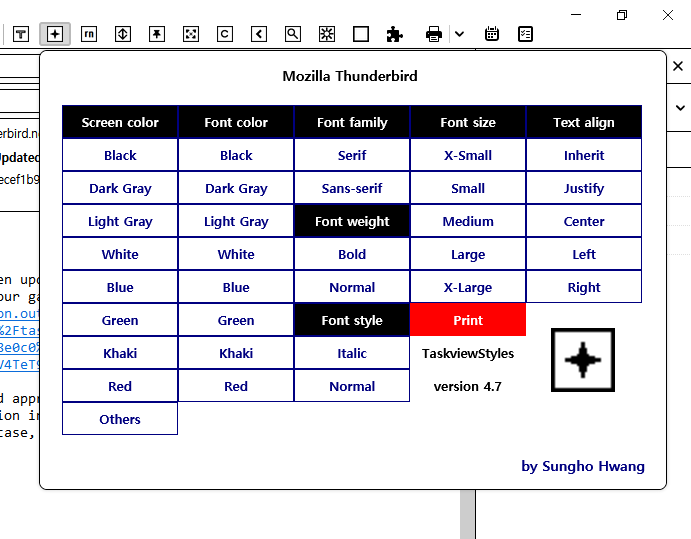
Version 4.5 updated in 2021-04-27.
1) Black, blue, green, khaki colors in Screen color were added.
2) Dark gray, light gray colors in Font color were added.
3) Style of browserAction popup window was changed.
4) Buttons which open New Event, New Task, Category, Mark COMPL, Priority were deleted.
5) Only two Experiment API functions were used as functions of style and print options.
6) 5 styles were used for each text align in order.
7) Version number was corrected on browserAction popup window.
8) Close function of Experiment.js was corrected by inserting reset function of text align.
9) Each text was aligned each line and applied by each align property.
If coupling with TaskDescriptions, it is good enough!
Please, use browserAction to put it at tabs toolbar in where browserAction is pinned.
Executed well.
To Hyun-geol who I like.
And, I am not a supported developer.
Would you contribute some to me for continuous developments.
I have happy dreams by one dollar and fifty cents,
like an international postage in minimum not a cup of coffee in high price.
1) Black, blue, green, khaki colors in Screen color were added.
2) Dark gray, light gray colors in Font color were added.
3) Style of browserAction popup window was changed.
4) Buttons which open New Event, New Task, Category, Mark COMPL, Priority were deleted.
5) Only two Experiment API functions were used as functions of style and print options.
6) 5 styles were used for each text align in order.
7) Version number was corrected on browserAction popup window.
8) Close function of Experiment.js was corrected by inserting reset function of text align.
9) Each text was aligned each line and applied by each align property.
If coupling with TaskDescriptions, it is good enough!
Please, use browserAction to put it at tabs toolbar in where browserAction is pinned.
Executed well.
To Hyun-geol who I like.
And, I am not a supported developer.
Would you contribute some to me for continuous developments.
I have happy dreams by one dollar and fifty cents,
like an international postage in minimum not a cup of coffee in high price.
